
TV Wall Mounting Checklist: What to Check Before Booking
A TV wall mounting checklist helps you prepare before anyone drills into your wall. A few checks can prevent delays. They can also prevent poor placement or the wrong bracket.
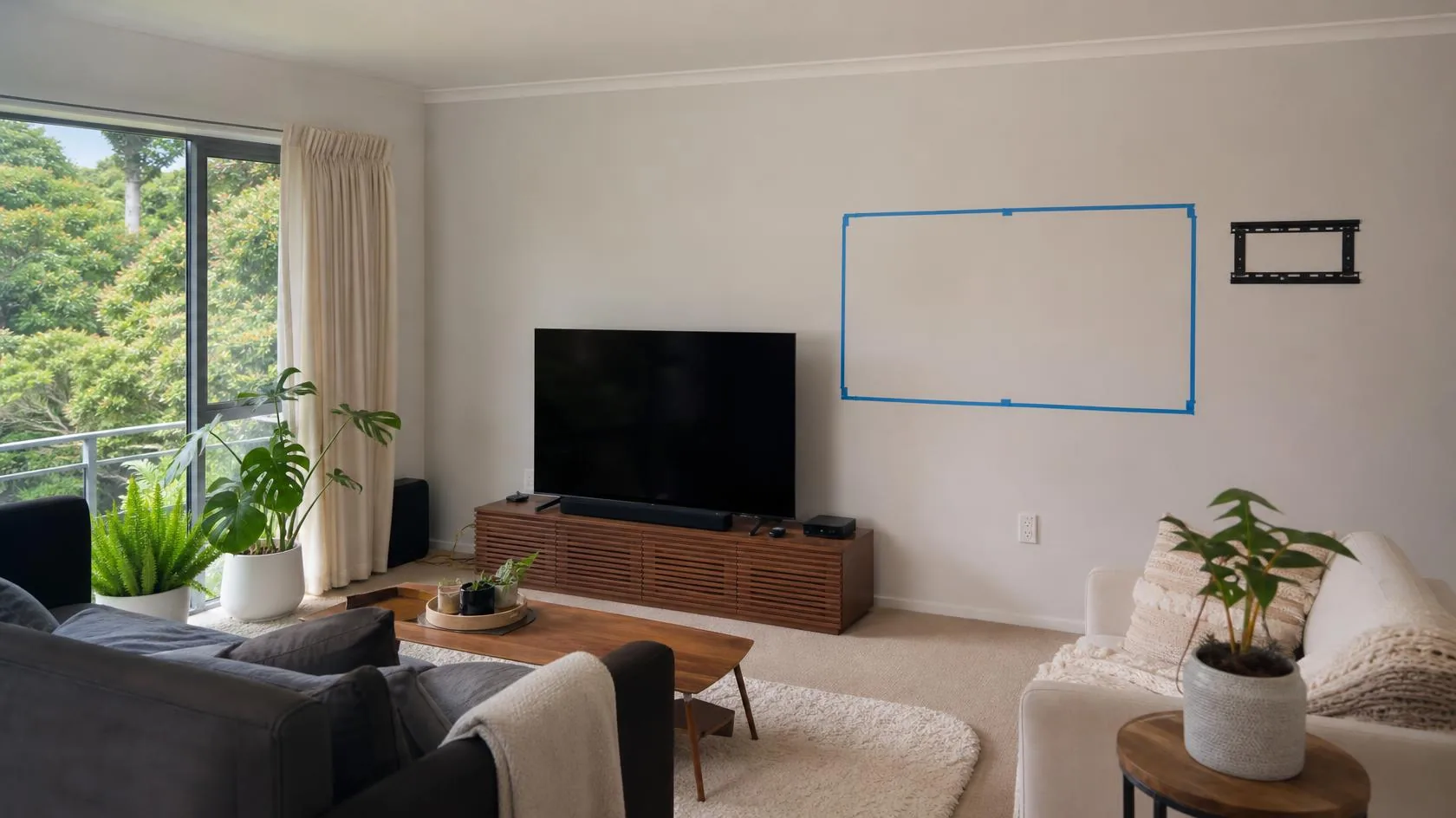
Before booking, note your TV model, wall type, bracket, viewing position, power points, and cable plan. Send photos if you can.
Quick TV wall mounting checklist
Check these details before you request a quote:
- TV brand, model, screen size, and weight
- Wall type and the area where the TV will sit
- Bracket type, weight rating, and VESA fit
- Main viewing position and preferred screen height
- Power point location
- HDMI, aerial, data, soundbar, console, and streaming cables
- Space needed for a fixed, tilt, or full-motion bracket
- Any fireplace, shelves, windows, or nearby fittings
- Whether a second person may be needed for a large screen
- Clear photos of the wall, TV, bracket, and nearby outlets
You do not need every answer before contacting us. These details help us assess the job. They also help us quote it clearly.
1. Check the wall before choosing the bracket
The wall must support the TV and bracket. It must also handle the force created when the bracket moves. Plasterboard, timber, brick, and concrete all need different fixing methods.
Do not assume plasterboard alone can carry a heavy TV. The wall structure and fixing points matter. The bracket design and TV weight matter too.
A full-motion bracket can place more force on the wall when extended. That makes secure fixing points more important.
If you are unsure about the wall, send a clear photo. Include a wider photo showing nearby doors, windows, corners, and fittings.
2. Find your TV model, size, weight, and VESA pattern
Your TV model helps identify its weight. It also shows the mounting pattern. The model number is usually on a label at the back.
Most wall-mountable TVs use a VESA mounting pattern. VESA describes the spacing between the mounting holes on the back of the TV.
For example, a TV may use a 200 x 200 or 400 x 400 pattern. Your bracket must support the exact pattern.
The bracket must support the TV's weight too. Screen size alone does not confirm that a bracket is suitable.
If you already own a bracket, send its model or packaging details. Keep the bolts and spacers that came with it. Keep any other fitting parts too.
3. Choose the bracket style for how you use the room
A fixed bracket keeps the TV close to the wall. It works well when you watch from one main seating area.
A tilt bracket lets the screen angle slightly up or down. This can help when the TV sits above normal eye level.
A full-motion bracket can extend. It can also swivel and tilt. It suits rooms where people watch from more than one position.
Full-motion mounts also need space to move. Check nearby shelves and cabinets before choosing one. Also check curtains, doors, and wall corners.
Do not choose a bracket only because it fits the screen. Check VESA fit, weight rating, motion range, and wall fixing needs.
4. Plan the viewing height before drilling starts
A TV can be secure and still feel uncomfortable if it sits too high. Start with the seat you use most.
Look straight ahead while seated in your normal position. The screen should feel natural without forcing your neck upward.
Bedrooms and open-plan rooms may need a different angle. A tilt or full-motion bracket can help in some layouts.
Mark the rough TV position with removable tape. Then sit down and check the height from your usual seat.
Also check how the screen looks from the side. This matters when several seats face the TV from different angles.
5. Check glare, windows, lights, and room layout
A bright window opposite the screen can cause glare. Ceiling lights can also reflect across glossy TV panels.
Check the room during the time you usually watch TV. Daylight can change the best screen angle.
A tilt or swivel bracket may help, but it cannot fix every glare problem. Sometimes moving the TV position works better.
Make sure the screen will not block a walkway or door. Also leave enough room around shelves and furniture.
6. Plan power and cable routes before the TV goes up
Make a list of every device connected to the TV. Common items include a soundbar, game console, decoder, aerial, and streaming device.
Check where the current power point sits. Also check the path for HDMI, aerial, Ethernet, and audio cables.
Surface cable covers can keep visible cables tidy. They are a simple option. In-wall cable routes depend on the wall and cable type.
New power points need the right electrical worker. The same applies to other prescribed electrical work. Shore Home Repairs does not perform regulated electrical work.
See our handyman versus licensed tradie guide for the wider boundary.
WorkSafe explains that paid prescribed electrical work must be done by an authorised electrical worker. We will flag that before work starts.
If your setup needs electrical work, it can be planned before the TV is mounted. This avoids moving the screen again later.
7. Take extra care with fireplaces and heat sources
A TV above a fireplace may sit higher than your normal viewing level. Heat can affect some TV models too.
Check your TV maker's heat guidance first. Also check any required clearance before choosing this position. Do not rely on one rule for every fireplace.
A mantel can change heat flow, but every setup is different. The wall structure behind the fireplace can also affect mounting.
If you want the TV above a fireplace, send a wide photo. Include the fireplace, mantel, wall, power points, and seating area.
8. Check space for plugs and devices behind the screen
Slim brackets leave little room behind the TV. Large plugs, adapters, streaming sticks, or cable bends can become trapped.
Check which ports you use and where they sit on the TV. Side-facing ports are often easier to reach after mounting.
If a device must stay behind the screen, confirm there is enough depth. Do this before choosing a very slim bracket.
A full-motion bracket gives more access, but it also changes the load on the wall. The bracket still needs secure fixing points.
9. Think about TV size and safe handling
Large screens can be awkward to handle. This is true even when they are not very heavy. Their width makes them harder to lift and control safely.
Some TVs also have very thin panels or narrow edges. The maker may give special lifting instructions for that model.
Do not lift a large screen by one corner or press hard on the panel. Follow the TV maker's handling guide.
Tell us the screen size when you request a quote. We can then assess whether the job needs two people.
10. Send the right photos for a faster quote
A few useful photos can answer many questions. They can help before the visit. They also reduce the chance of missing parts or access issues.
Send one wide photo of the full wall. Then send closer photos of the proposed mounting area and nearby power points.
Include the TV model label if it is easy to reach. Also send the bracket label, box, or product link if available.
Tell us where you normally sit and where you want the TV. Mention any soundbar, console, decoder, or other connected device.
You can also review our TV wall mounting service before requesting a quote. It explains the installation work we handle.
What should be confirmed before drilling?
The final position should be agreed before any holes are made. The wall, bracket, TV, cables, and nearby services should also be checked.
A good pre-install check should confirm:
- The wall can accept the planned fixing method
- The bracket suits the TV's VESA pattern and weight
- The screen height works from the main seat
- The bracket has enough room to move
- Power and signal cables have a clear plan
- Nearby fittings or hidden services do not create an obvious conflict
- The TV can be lifted and positioned safely
- Any electrical work is separated from the handyman work
These checks take little time compared with moving a TV after installation.
Before you book
Gather the TV model, bracket details, wall photos, and your preferred position. Then note how you want the cables to look.
If you are unsure about any detail, send what you have. We can review the setup and explain the next practical step.
For a broader guide, see what jobs a handyman can do around the home. You can also review our Auckland handyman cost guide.
Frequently asked questions
Can you mount a TV if I do not know the wall type?
Yes, you can still request a quote. Send clear photos of the wall and the area around it.
We can assess the likely wall type and confirm what needs checking on site. We will not assume a fixing method before inspection.
How do I find my TV's VESA size?
Check the TV manual or the maker's product specifications. You can also measure the mounting holes in millimetres.
Send us the TV model if you are unsure. We can use it to check bracket compatibility.
Can TV cables be hidden inside the wall?
Sometimes, but the answer depends on the wall and cable type. Power wiring has separate rules.
A surface cable cover is often the simpler option. We will flag any work that needs an authorised electrical worker.
Is a full-motion bracket better than a fixed bracket?
Not always. A fixed bracket is simple and keeps the TV close to the wall.
A full-motion bracket helps when you need swivel or extra access. It also needs more wall support and movement space.
Can a TV be mounted above a fireplace?
Sometimes, but heat, wall type, screen height, and maker guidance all matter. Check those points before choosing the position.
Send a wide photo of the fireplace wall and seating area. That helps us assess the layout before quoting.
What should I send when asking for a quote?
Send the TV model, screen size, wall photos, bracket details, and preferred position. Include nearby power points and connected devices.
More detail helps before the visit. It also helps us give you a clear next step.
Ready to get it sorted?
Send us your job details and we’ll come back with a clear quote.